Disaster Recovery for Start-ups in AWS
The first time an enterprise customer asks ‘What is your disaster recovery plan?’ in a security questionnaire, most start-up founders…
The first time an enterprise customer asks ‘What is your disaster recovery plan?’ in a security questionnaire, most start-up founders realize they do not have a great answer. If you can recognise yourself in that situation, do not worry, you are not alone and this article is here to help you!
Having a solid disaster recovery strategy is necessary for any company, but for start-ups it typically becomes urgent when scaling to enterprise customers, whether through ISO27001 certification requirements, a security questionnare or a proactive team member raising the red flag.
Before diving into the practicalities and different strategies, let’s start with understanding the basic terminology.
What is a “Disaster”?
Disasters come in many shapes and forms, but can refer to cloud services being unavailable, a software engineer deploying a bug that corrupts data or ransomware making its way into your environment.
Data centers, Availability zones and Regions
These terms are typically used in the context of disaster recovery, let’s make sure we understand the concepts.
A data center is simply the facility that manages the AWS servers, networking, storage and so on.
Availability zones (AZ) are isolated geographical areas with separate power grids and networking from other AZs. The isolation is needed to reduce the impact to your services when a fiber cable is cut off, it might cut off the networking to AZ-1, but since AZ-2 is on a separate fiber cable — your customers are still able to use your service. An AZ contains one or multiple data centers.
A region on the other hand is a set of availability zones, ranging from 3–6 availability zones, which in turn consists of one or more data centers.
AWS Disasters
Looking from the perspective of the services offered by AWS, there are different types of failures to consider.
Entire region goes down
This is extremely rare and I struggled to find any documented full-outage in the last 10 years.
Service goes down within a region
This is still rare, but has happened, and depending on what service becomes unavailable or how reliant you are on that service — you might feel like the entire region is down.
Availability zone failure
Still rare, but not unheard of and therefore an important risk to consider when designing your infrastructure.
What do I need to consider to implement a disaster recovery plan?
When (and not if) a disaster hits your infrastructure the clock begins, and you need to have considered two things:
- Recovery time objective (RTO) — how long it takes for your services to get back online
- Recovery point objective (RPO) — how much data you are willing to lose.
Although this might sound very technical, this is a decision that will have a major impact on your AWS bill, your ways of working and company culture. In a nutshell, the lower the RTO and RPO, the more you pay for your infrastructure.
Carefully consider the impact on your business if you were to be offline for X amount of seconds/minutes/hours and were to lose Y amount of data, where Y is the time of your latest backup.
Good practices
Before deep diving into your options and how you could structure your organisation and infrastructure, let’s cover some good practices that you should consider to adopt:
Multiple availability zones
When deploying to AWS, make sure that you are deploying to multiple availability zones — at least two. An availability zone consists of one or more data centers that are running with different power and network grids to the other availability zones. Meaning if the fibers are cut to availability zone 1, it will not have an impact on availability zone 2.
Infrastructure as code
Defining your infrastructure as code enables you to quickly, in minutes, set up a new environment that is consistent with your existing one. This does however require investment or specialized knowledge from your engineering team, but having a general knowledge and using your favourite LLM could take you a long way and save you plenty of time when disaster hits.
Automated backups
You can only restore to your latest backup, so make sure you have enabled the automated backups in AWS. The more often you backup, the less data you will lose in a disaster. But you must also consider the cost generated by too frequent backups, go back to the RPO and set the appropriate time interval.
Monitoring and alerts
When an outage occurs, you want to know about it right? Make sure you have properly configured monitoring of your AWS resources and that you have an organisational process that allows you to address the issues. I.e. who wakes up in the middle of the night to fix the issue?
Practice makes perfect
Every engineering team loves a good challenge, so make sure that you are practicing disaster recovery and run simulated events so your team is ready. The most common issue during outages are that documentation is not up to date, someone has hard coded a resource address in the code that now needs to go somewhere else and so on. This is why you practice, to uncover the holes in your plans.
What are your options?
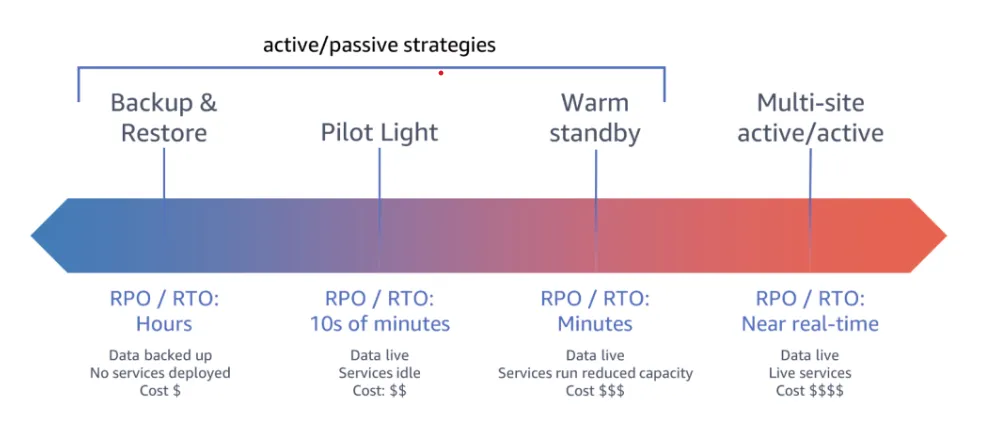
AWS offers four different strategies, ranging from an inexpensive alternative with higher RTO and RPO, to a duplicated environment with minimal to no downtime but at a 2x price of running in a single region.
Keep in mind that your entire environment does not need to rely on a single strategy, you can mix strategies for different domains in your business. Internal tooling might use one strategy, while your customer facing services rely on another.
Backup & Restore
This is the cheapest option and relies on your teams ability to redeploy your current infrastructure in a new region and get a new database running with an old snapshot.
If you are running in eu-central-1 you should make sure to backup your files to another region such as eu-west-1.
When to use
Best suited for when on a low budget or when you can accept higher RPO and RTO. Could be suitable for non-critical services such as internal tooling.
Pilot Light
With Pilot Light you have your main region and you synchronize your data to another region while keeping the rest of your infrastructure at idle. When disaster hits you “flick the lights”, meaning the idle instances start running at production capacity and your traffic gets routed to the new region.
When to use
Popular alternative that can offer low RPO and RTO given sufficient practice and use of infrastructure as code, while being budget friendly.
Warm Standby
Warm standby is quite similar to Pilot light, but the main difference is that your failover region will have business critical services running at reduced capacity.
When disaster hits, your traffic will be routed to the failover region and you must scale up the services running to handle the production traffic.
When to use
Good alternative if “flicking the switch” in the Pilot light does not yield a sufficiently low time to recovery (RTO) for your business needs.
Active/Active
In an active/active setup you are running two or more regions at production capacity. Each region will handle requests and if one region goes down, Route 53 together with health checks will start routing traffic to a healthy region.
There are multiple strategies for handling write operations to your database, where one common approach is to have your main database in your main region and use read replicas in other regions. The read replicas can then be promoted to main in case of disaster.
When to use
To be used for business or socially critical services that requires close to zero RTO and RPO.
Summary
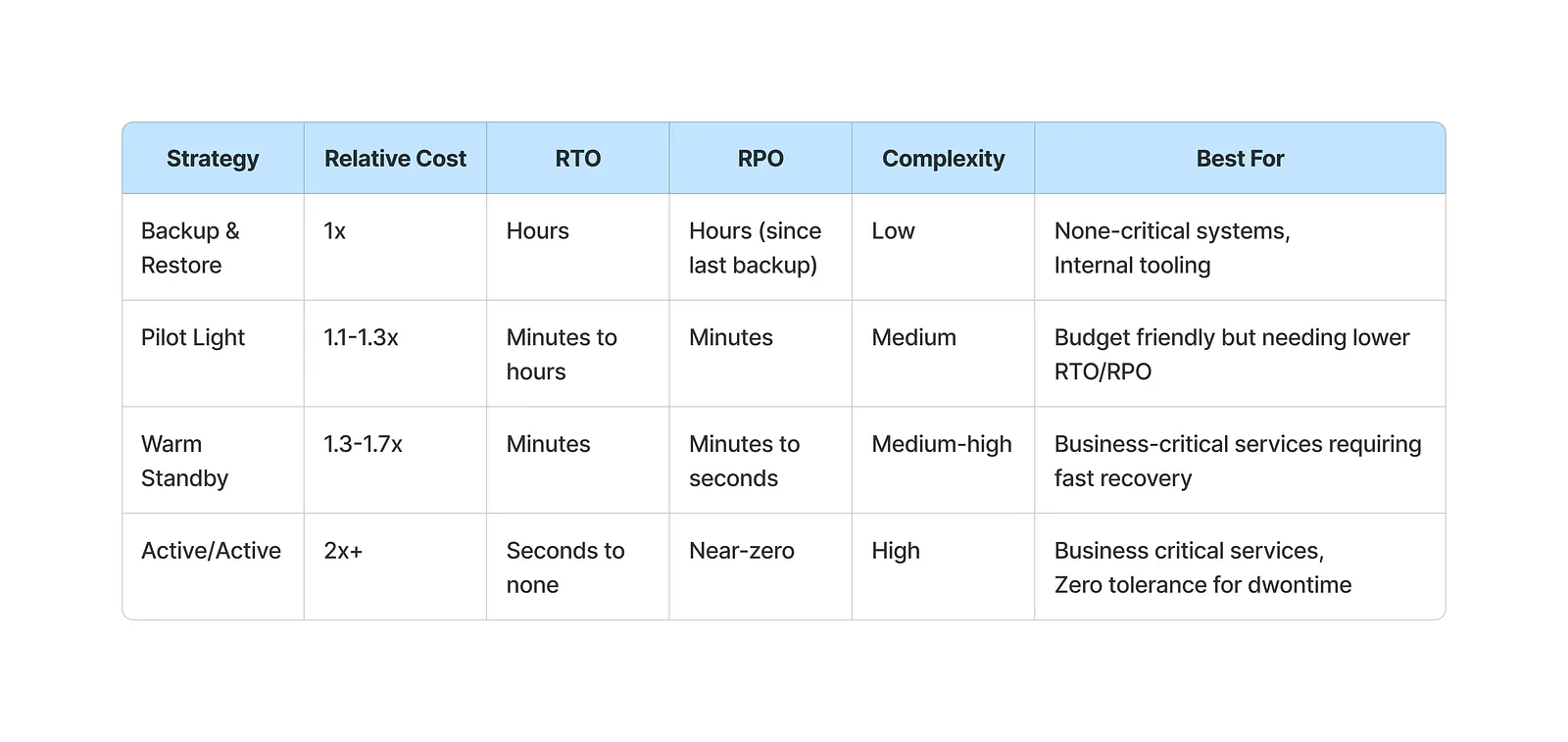
I hope that the article has provided more insights to your disaster recovery plans, below I have defined a summary table for the different strategies — but please keep in mind that the accuracy varies heavily in different organisational contexts.
The best way to find out the real answer is to circle back to the “good practices” section and carry out a test run with your team!
I recommend you to read the following
https://docs.aws.amazon.com/whitepapers/latest/disaster-recovery-workloads-on-aws/disaster-recovery-options-in-the-cloud.html